
Animate a Drawing Into a Video With AI
 Drawing to Life AI
1 Choose your photos
Use a clear photo of the complete drawing. Do not use a photo of a real person in the drawing slot.
2 Your scene
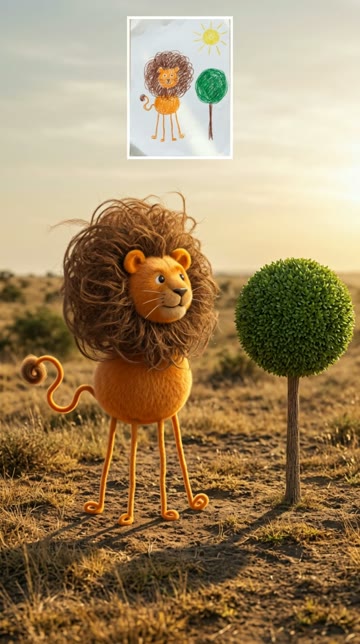
Drawing to creatureA creature from a drawing becomes a lifelike figure in a short scene.
3 Choose output quality
Higher quality may use more credits. Check the quote before creating.
Checking the credit price…
- No app
- Price shown before you create
- Confirmed failures return reserved credits
What this effect is designed to show
A creature from a drawing moves in a new setting, with the drawing available for comparison.
How to use this effect
- Add a clear, authorized image to each labeled slot. Each role uses the image in its own slot. Use a straight-on image of the whole drawing with clear outlines and little glare. Before sharing, check any third-party image, likeness or audio rights. Review image and audio rights
- Starting settings · Target length 8s · 9:16 · 1080p. Sign in and check the credit quote before submitting. If the selected settings are unavailable, keep your draft until a quote is available. A confirmed generation failure returns reserved credits. If submission status is unknown, keep your draft while the existing task is checked.
- Compare the small original-image inset with the animated creature, especially the outline and colors. This recipe requests generated audio. Listen before sharing. A prepared image guides the opening. Use this effect
Questions about this effect
How many images do I need?
Upload one image for the role shown in the tool. Photo of a drawing. Use a straight-on image of the whole drawing with clear outlines and little glare.
What should I check in the result?
A creature from a drawing moves in a new setting, with the drawing available for comparison. Compare the small original-image inset with the animated creature, especially the outline and colors. This recipe requests generated audio. Listen before sharing. A prepared image guides the opening. Watch the whole clip to check the subject, motion and ending. Generated detail and timing can vary by image and model.